
Voice Infrastructure Upgrade

Organisations still running traditional wired telephony face rising maintenance costs, ageing exchange hardware, limited flexibility, and increasing vulnerability to faults.
Voice Infrastructure upgrade is our structured, one-time implementation service that takes an organisation from legacy copper telephony to a modern, internet-based voice system — designed, installed, configured, tested, and handed over as a working solution. The upgrade process is simpler than many imagine, and with the right plan in place, it can transform the way your organization communicates.
Why migrate? PBX vs VoIP
| Traditional PBX | VoIP | |
|---|---|---|
| Setup cost | Large upfront investment for on-site hardware | Requires little equipment — just internet |
| Ongoing cost | $$ maintenance costs, including dedicated staff | Small monthly subscription fee |
| Scaling | New phone line drops and physical equipment needed | Highly scalable — add lines instantly |
| Mobility | Call forwarding is the only way to use your number outside the office | Take and use your number anywhere you have internet |
What is a VoIP phone?
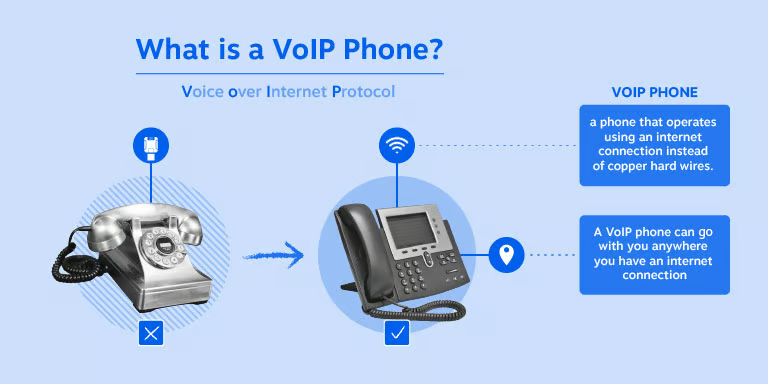
A VoIP phone makes calls over the internet using Voice over IP technology rather than a traditional copper line. Instead of plugging into a wall jack or an on-premises PBX closet, it registers directly with a cloud communications platform — which is what makes it so flexible. It can take several forms depending on how staff work:
- Dedicated IP desk phones — Physical hardware that looks and feels like a standard office phone, connected via Ethernet or WiFi instead of copper.
- Desktop softphones — Applications turning a computer into a full-featured phone.
- Mobile VoIP apps — Professional business lines running over WiFi or cellular data on a smartphone.
- Web-based dialers — Browser-based calling with no software install required.
The migration process
- 1
Design
- Assessment of existing telephony setup, call volumes, and staff extension requirements
- Network and WiFi readiness review to confirm capacity for VoIP traffic
- System architecture design — PBX platform, cloud hosting location, extension numbering plan, call routing logic
- Hardware specification — desk phones, gateways, and any network equipment required
- 2
Installation
- Cloud server provisioning and secure configuration
- PBX deployment (FreePBX or equivalent) with security hardening
- Desk phone unboxing, physical setup, and network connection
- Mobile/softphone app installation for staff devices
- 3
Provisioning
- Extension creation and mapping for every staff member
- Voicemail, call routing, ring groups, and internal dial plan configuration
- Caller ID, extension directory, and department/queue setup
- Integration with existing infrastructure where applicable (e.g. GSM gateways for external calls via mobile network SIMs)
- 4
Testing
- Full internal call testing across all extensions
- Call quality (QoS) and network performance validation
- Failover and reliability checks
- Sign-off testing with client representative before go-live
- 5
Support & Handover
- Staff training on how to use the new system (desk phones and mobile app)
- System documentation and handover report
- Transition into ongoing Managed Voice Support for continued monitoring, troubleshooting, and technical assistance post-launch
Advantages of moving to VoIP
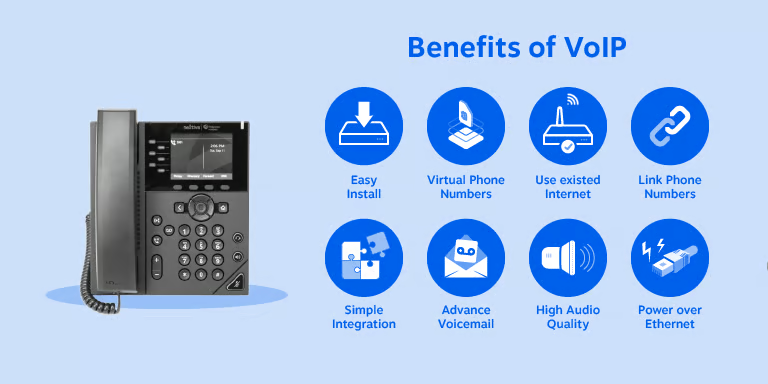
- Streamlined setup — no complex physical installation; deploys over existing broadband and integrates natively with tools like Microsoft Teams or Salesforce
- Dynamic number linking — create virtual regional numbers, assign them to users or departments, and port existing numbers over for free
- Professional mobility — staff make and receive calls from laptop, desk phone, or mobile app interchangeably, all under one corporate caller ID
- Advanced call handling — multi-level auto attendants, smart call routing, voicemail-to-email, and built-in video conferencing as standard
- Scalability and ROI — scale lines up or down instantly from a dashboard, no technician callouts or on-premises server purchases
- Lower international/inter-branch calling costs — calls between offices or overseas branches ride the same internet connection instead of accruing per-minute PSTN charges
- Business continuity — since a phone number isn't tied to a physical line, calls can be rerouted instantly to another location or mobile device during an outage or office closure
- Built-in analytics — call data is inherently digital, feeding directly into CDR reporting and dashboards (a natural pairing with our own CDR Intelligence & Live Dashboards service)
- Easier compliance and call recording — recording, archiving, and retrieval are native cloud features rather than bolt-on hardware
- No line-power dependency on-site — reduces the physical maintenance burden of copper infrastructure, though backup power should be planned for since IP phones typically need their own power source
Why it matters:
Staying on outdated copper infrastructure means rising costs, limited flexibility, and eventual forced migration. Upgrading now gives you lower call costs, richer features, easier scaling, and a communication platform that grows with your business — without the downtime and confusion of doing it alone.